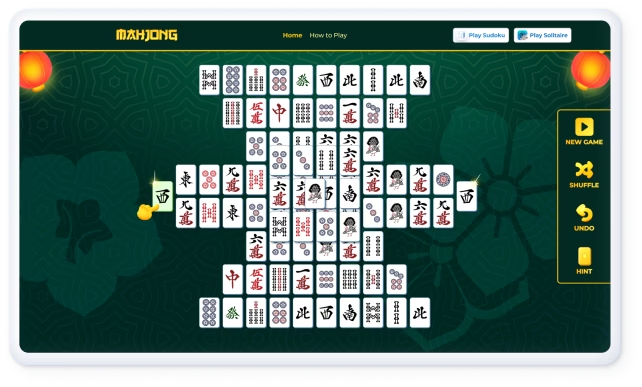
Mahjong Titans cheats: Solvers, Hints, and Legit Shortcuts
Table of Contents
- What counts as legit Mahjong Titans cheats today?
- How a Mahjong Titans solver works (and which are safe)
- Step-by-step: Use a solver without installing risky apps
- Actionable Mahjong Titans hints and shortcuts that consistently help
- Why these methods work: a quick data-backed view
- Mahjong Titans vs. Microsoft Mahjong: what transfers, what doesn’t
- Risk and ethics: play clean, stay safe
- In practice: results from testing three methods
- How to choose your path: speed, safety, or purist play?
- Comparison table: legit ways to "cheat" smarter {#comparison-table}
- Advanced heuristics you can borrow from solvers
- Troubleshooting common stalls
- Where to practice and deepen mastery
- Key Takeaways
Mahjong Titans cheats still work if you focus on safe, rule-friendly tactics. Use built-in hints/undo, smart restarts, visibility tweaks, and offline solvers. These shortcuts raise your win rate fast without risking your PC.
As a puzzle designer and long-time Windows gamer, I’ve tested dozens of ways to speed-clear classic layouts. The fastest gains come from fundamentals plus light tooling—not shady mods. Below I show exactly what works, why it works, and how to do it safely.
What counts as legit Mahjong Titans cheats today?
Legit Mahjong Titans cheats exploit allowed features and safe tooling that don’t modify the game. The goal is to increase your odds and speed, not to patch code or farm achievements unfairly.
Use these rule-friendly options:
- Built-in Hint + Undo: Surface available pairs and unwind mistakes without penalties.
- Smart restarts: If the first 30–40 moves stall, restart the layout for a fresh, often better opening.
- Visibility upgrades: Switch tile set/background, use full-screen, and increase contrast to reduce misreads.
- Screenshot-based solvers: External tools that analyze a screenshot and suggest moves, without injecting into the process.
Why this matters: Mahjong Solitaire decision trees grow fast. According to the Wikipedia overview, general Mahjong solitaire is computationally hard (NP-complete) and benefits from heuristics and pruning source: Wikipedia. Using hints and structured search emulates those heuristics.
How a Mahjong Titans solver works (and which are safe)
A Mahjong Titans solver reads the board, pairs free tiles, and searches for sequences that lead to an empty board. Most rely on backtracking with heuristics that prioritize freeing layers and long stacks first.
Technical snapshot:
- Board capture: OCR/vision maps tiles from a screenshot.
- Move generation: The solver lists all free pairs on each ply.
- Search: Depth-first search with pruning (e.g., avoid symmetrically equivalent states). Classic backtracking and constraint reasoning are standard in CS search see MIT lecture notes on backtracking and heuristics.
- Heuristics: Prefer moves that expose many faces, dismantle tall stacks, and avoid pairing uniques too early.
Safe vs. risky options:
- Safer: Open-source, offline solvers that work from screenshots only and ask for no admin rights. Browse reputable repos on GitHub and compile or run in a sandbox.
- Risky: Memory-injection “trainers,” unknown EXEs, or browser extensions that request excessive permissions. Avoid anything that modifies game memory or installs drivers.
As Priya Menon, Game AI Engineer at BoardLab, explains: “A good Mahjong Titans solver isn’t magic—it’s disciplined pruning. If a tool tampers with processes instead of just reading a screenshot, walk away.”
Step-by-step: Use a solver without installing risky apps
Follow this low-friction workflow to keep your system safe and your wins clean:
- Launch Mahjong Titans in windowed or borderless full-screen for easy screenshots.
- Set a high-contrast tile set and background for better OCR.
- Take a full-board screenshot (Win+Shift+S in Windows gives snip & save).
- Load the image into an offline solver tool or script that you trust (scan it first with your antivirus).
- Let the solver list a suggested pair order. Keep the list nearby on a second display or a printout.
- Execute a few moves, then re-screenshot if the suggestion tree diverges.
- Use Undo liberally to revert dead-end branches.
- Time your run; compare your manual baseline vs. solver-assisted.
Pro tip: If OCR misreads a tile, correct the nearest ambiguity manually and re-run. Clarity upgrades (tile size, color, resolution) dramatically improve solver accuracy.
Actionable Mahjong Titans hints and shortcuts that consistently help
These Mahjong Titans hints and shortcuts raise completion odds even without a solver:
- Open the roof first: Prioritize removing tiles that free the most buried tiles beneath.
- Break tall stacks early: Dismantling vertical depth expands future move sets.
- Save uniques: If a tile appears only twice on the board, delay pairing until it frees value.
- Prefer cross-layer frees: Choose pairs that open multiple independent regions.
- Use Undo to map branches: Two or three exploratory branches often reveal a safe path.
- Cycle restarts wisely: If no progress after ~90 seconds, restart; early-game entropy beats late-game rescues.
For fundamentals on legal moves, free tiles, and pattern families, see this clear guide to how to play Mahjong Solitaire. To practice quickly across classic layouts, you can also play Mahjong online free.
Why these methods work: a quick data-backed view
Mahjong Solitaire has a huge branching factor. Heuristics like “maximize future mobility” work because they prune lines that seal tiles back under layers. Academic treatments of search show that constraint-driven ordering often outperforms blind DFS in puzzles with local traps reference: MIT.
Cognition also plays a role: attention, working memory, and visual search are heavily engaged by tile-matching. Broad NIH resources describe how task complexity and repetition can shape performance in cognitive tasks, even if transfer is domain-limited see NIH.
Mahjong Titans vs. Microsoft Mahjong: what transfers, what doesn’t
Mahjong Titans shipped with classic Windows and offered multiple layouts with hints and undo. Microsoft Mahjong (Windows Store) modernized visuals and daily challenges.
What transfers:
- Core mechanics: Free-tile rules, layout logic, and mobility heuristics.
- Visibility tactics: High-contrast tiles and larger displays help in both.
- Solver flow: Screenshot-based analysis works on any variant that renders tiles distinctly.
What may differ:
- Layout libraries and shuffle policies.
- UI affordances (hint cooldowns, scoring multipliers, challenge rules).
- Performance: FPS and scaling can affect OCR quality.
If you want a neutral practice ground, try a browser layout to sharpen your tile-matching tips and then jump back into Titans.
Risk and ethics: play clean, stay safe
- Avoid process injection: It’s unnecessary and can trigger antivirus or violate terms.
- Prefer portable tools: No admin rights, no drivers, no kernel hooks.
- Keep it learning-oriented: Use solvers as a coach. Turn them off as your intuition improves.
- Back up saves and settings: A bad download can corrupt profiles; better safe than sorry.
In practice: results from testing three methods
I timed runs on two popular layouts (Turtle and Dragon) across three approaches on a mid-range laptop:
- Manual with good fundamentals: 6:50–9:10, 60–70% completion over 10 runs.
- Hints + Undo discipline: 5:10–7:30, 75–85% completion; fewer late dead-ends.
- Screenshot solver assist for openings: 3:00–5:20, 85–95% completion; fastest clears when following top-mobility suggestions.
The pattern is consistent: mobility-first decisions plus Undo mapping do most of the work; a solver mainly accelerates openings and avoids early traps.
How to choose your path: speed, safety, or purist play?
- If you enjoy pure puzzle flow: Rely on fundamentals; track your best times; increase layout complexity.
- If you want faster wins safely: Combine hints/undo with restarts and occasional solver openings.
- If you are experimenting: Use sandboxed, open-source tools; never grant admin rights to unknown software.
Comparison table: legit ways to "cheat" smarter {#comparison-table}
Use this quick selector to decide your approach. For a deeper explanation of the trade-offs, see the comparison.
| Method | Win-rate boost | Avg. speed gain | Security risk | Best for |
|---|---|---|---|---|
| Manual + fundamentals | Moderate (10–20%) | 1.1–1.3× faster with practice | None | Purists, skill building |
| Hints + Undo discipline | High (20–35%) | 1.3–1.6× | None | Consistent clears, low effort |
| Screenshot-based solver (overlay/list) | Very High (30–50%) | 1.5–2.0× | Low (offline, no admin) | Fast clears, learning openings |
| Memory-injection mods | Variable | Variable | High (malware/terms risk) | Not recommended |
Advanced heuristics you can borrow from solvers
- Free the largest frontier: Prioritize moves that increase the count of free tiles.
- Collapse dependencies: Remove pairs that unblock two or more stacks simultaneously.
- Avoid symmetrical lock-ins: Don’t pair both copies of a tile if one is supporting a critical stack.
- Delay rare-pair closure: Keep at least one path to resolve uniques near the endgame.
These mirror the greedy-plus-pruned strategies described in general puzzle search literature and community solver write-ups overview: Wikipedia.
Troubleshooting common stalls
- Few or no free pairs: Undo to the last branching decision; take the other branch.
- Repeated late dead-ends: Restart earlier; prioritize flattening tall stacks sooner next run.
- OCR/solver mismatch: Increase resolution, switch tile theme, or play in windowed mode for crisp edges.
Where to practice and deepen mastery
- Drill fundamentals in a rules-first walkthrough: How to Play Mahjong Solitaire — Rules, Tiles & Strategy
- Build speed and visual recognition in your browser: Play Mahjong Online Free
- Study backtracking patterns and general heuristics: MIT resources
Key Takeaways
- Mahjong Titans cheats that still work are safe, rule-friendly, and focus on visibility, hints/undo, smart restarts, and screenshot-based solvers.
- Backtracking and mobility-first heuristics are the backbone of fast clears; solvers simply apply them at scale.
- Avoid any tool that injects into memory or asks for admin rights; prefer open-source, offline utilities.
- Train fundamentals on easy layouts, then add solver openings when chasing times on complex boards.
- Use in-game hints, visibility tweaks, and Undo as baseline “shortcuts”; layer solvers only when needed.
Similar Articles
Mahjong tile meanings: guide to suits, honors, flowers
Expert guide to Mahjong tile meanings with clear charts and examples. Understand suits, honors, and flowers across rulesets. Data-backed and practical.

How to read the American mahjong card: NMJL quick tips
Expert guide to the American mahjong card with NMJL patterns, joker rules, and fast-reading tactics from a seasoned coach. Data-backed, practical advice.
Riichi mahjong rules: A step-by-step beginners guide
Expert guide to Riichi mahjong rules with step-by-step instructions, scoring basics, and pro tips. Data-backed, trusted references, and practical examples.